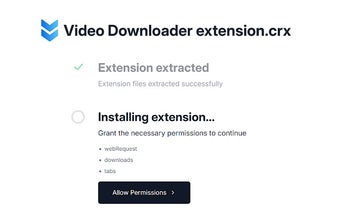
CRX Emulator is a dedicated utility for Chrome designed to help developers and security researchers test and debug Chrome extension files. It targets users who want a simple method to work with Chrome extensions, providing a basic enhancement to the browser’s add-on capabilities.
The software offers a safe and installation-free solution for running extensions. By using a sandboxed environment, it ensures that .crx files are executed with complete isolation from the user’s main profile. Its specific technical function is to run and test .crx files without installation into the main browser to protect the user's primary browser profile from unverified code.
There is a provided standalone interface for debugging extension files and words as a specific utility for developers and security researchers. Overall, CRX Emulator streamlines the workflow for users who need to verify offline extensions without toggling advanced browser settings. Additionally, the tool does not collect, store, or transmit any user data to third-party servers, and all settings and extension data remain within the local browser storage.
Controlled sandbox environment for execution
Unlike standard browser installation, this tool allows for the execution of extension code within a secure sandbox environment, preventing unverified or experimental software from accessing the user’s primary browser data or modifying system settings. However, this can be a limitation since deep-level browser APIs like specific OS-level integrations may not behave as they would in a native installation. Additionally, CRX Emulator requires permissions to read and write data to the local sandbox environment.
Focused and Effective for Extension Development
Overall, CRX Emulator addresses a niche need for Chrome users looking to test extensions locally within the browser environment. However, since it operates within a sandbox, some extensions that rely on deep integration with the Chrome Management API or specific operating system features may exhibit different behaviors compared to a native installation. Overall, it stands as a focused environment for debugging without the bloat of external applications, making it a lightweight yet effective choice for maintaining browser security while exploring new add-on functionalities.
Pros
Functions directly within Chrome as an extension testing tool
Laws concerning the use of this software vary from country to country. We do not encourage or condone the use of this program if it is in violation of these laws. Softonic may receive a referral fee if you click or buy any of the products featured here.